Friday, November 5, 2010

Research Experiment: FINAL TUTORIAL VIDEO

Attachment and Detachment of Numerous Independently Moving Entities

NOTE: HIGHLY RECOMMENDED TO VIEW FULL SCREEN AT 1080P HD.

The final version of my video tutorial regarding the attachment and detachment of various independently moving entities is presented above for final submission. The video has been separated into 4 key stages; the demonstration cubes formation, the setting out of the rotation points and mechanism, the setting out of the skeleton and its related operations and finally the attachment between the skeleton and the rotating mechanism. For further ease of understanding and convenience each flow graph is presented at the beginning of the tutorial as well as a table of content outlining when each stage of the tutorial begins. Finally I have attempted to present the tutorial with a sense style to engage the responder visually.

Research Experiment: 500 WORD TUTORIAL STATEMENT

With regards to the intention of my video tutorial regarding the application of flow graph nodes within a unique and interesting manner I decided to develop the notion of attaching and detaching individually and independently moving uniform entities. Through developed research I have discovered that there is serve lack of information and tutorials regarding complex operations of numerous entities management. Thus through my tutorial will the responder be presented with a manner in managing and controlling numerous entities within the field of rotation.

The tutorial subject is classified as advanced and portrays such through the formation of basically a Rubik’s cube within the Sandbox Editor requiring the responder to have a basic understanding of the program. The technique used involves the formation of an invisible skeleton (which at the beginning is visible to allow for set up) which moves around the exterior of the main cube, checking upon a key press whether the cube beneath is in the correct position for attachment. If true it attaches if false it does not. Such allows for individual entities to be managed within a larger overall state.

With regards to the body of information at which my video tutorial influences I wished to explore simply the field of as stated advanced entity management. Research upon the general internet and more specifically, Cry Wiki, CryMod and You Tube has presented it to be quite clear that there is limited information within this field as currently there only exists basic information on such as attaching an entity to the local player. Through my tutorial I will fill in the body of knowledge comprehensively and in a manner which will allow the individual to adapt the concepts presented in their own manner, thus meaning my tutorial will not only present a single notion and concept but rather provide a gateway to extendable knowledge achieved through individuals interaction, perception and adaptations of my video tutorials concepts.

In terms of the presentation of my tutorial I have considered the options between verbal and written communication upon their various positive and negative aspects. In terms of verbal communication I identified the notion of direct connect as the individual is engaged by the voice of a real human. However when one outlines a very complex and detailed concept it is sometimes hard to follow and keep up with what they are presenting. While written tutorials although not necessarily as in engaging allows the individual to pause the video at the various stages noting the concepts and processing them in their own time. Therefore I have decided to present my tutorial using written communication due to the complexity of my tutorial. The tutorial is divided into relative stages, upon were each stage is further divided into individual steps. Each series of steps is presented, before then the relative video for those steps is displayed while a small letter in the upper left hand corner alludes to the current step at which the video is up to within that stage.

EXP 2: FINAL POROSITY LENS DOCUMENTARY

- Depressions Complex Continuum -

NOTE: HIGHLY RECOMMENDED TO VIEW FULL SCREEN AT 1080P HD

Presented above is the final version of my porosity lens documentary for final submission. The documentary is titled “Depressions Complex Continuum” as it intends on outlining the manner in which an individual with depression interacts with their environment with reference to their mental state. The beginning of the documentary portrays an initially formed station which as the protagonist begins to simply walk through, changes becoming disordered from its original state, portraying the notion that individuals with depression through interaction may cause disorder within their own mental state and environment. While however as the documentary progresses the protagonist begins to run in the search for order within his environment and thus mental state. Such increased momentum alludes to the emotional state of anxiety related to depression while at the end when the protagonist eventually restores order, as presented through the re-formation of the original state of order upon the station, he remains suspended within his environment and thus depressions continuum, until eventually it consumes his entirety.

EXP 2: Final Sketch Up File

The link below presents the final Sketch Up file collaboration. It includes my custom installation together and separated, the modified station model together and separated, the installation and station together as a single unit and the station and installation separated with textures applied.

http://www.filefront.com/17478355/z3333170_BENV2423_EXP2_SketchUpComponents.skp

EXP 2: Final Crysis Levels and Object Files

The provided links below allow for the download of my levels folder and objects folder regarding Experiment Two. Note however due to the extreme complexity of final level concept, for filming purposes I was unable to film every series within one file due to that every computer I attempted such on either crashed and ran so slowly that fraps was basically just taking a series of stills. Therefore each take is separated into individual aspects of the three main journeys the protagonist portrays within the final documentary.

Levels Download:

http://www.filefront.com/17474172/z3333170_Crysis_Levels.zip

Objects Download:

http://www.filefront.com/17474197/z3333170_Objects.zip

Thursday, November 4, 2010

EXP 2: Week 7: Documentary Inspirations

- Inception Film Trailer -


The film inception is a prime example of the physical state of an environment I am attempting to achieve within my porosity lens documentary, especially as presented at the stage of 44 seconds in. It portrays perfectly the notion of an environment which is out of order and contorting to the interactions of the individuals. Through such strong and yet simple interactions is one able to study the manner in which those interactions alter the individuals environment, and more importantly there mental state, thus my porosity lens.

- This Mortal Coil -

The particular video above presents an interesting manner of emotional portrayal. It effectively stimulates the related emotions to the content of the video through the use of audio and presentation. Something which I wish to achieve within my porosity lens in terms of presenting an emotionally depressive state. In particular I like the manner in which the video begins through the use of small captions to focus the attention of the responder, a technique which I may use myself.

- Sin City Trailer -


The video above presents an interesting presentation method enhancing the use of black and white through the use of high lightening colour. Through unique presentation filming views is the viewer stimulated to delve deeper into the meaning behind. Furthermore this particular video develops on portraying a depressive state as rain and light is used in association with a night sky to create an overall very gloomy and dark environment.

Sunday, October 31, 2010

EXP 2: Week 7: Research Continued...

Entity Rotation Fall Through Problem:
Upon further implementation of my porosity lens concept and testing I discovered that when an basic physics entity is rotated the enabling of collisions is disabled, thus one falls right through when walking on the surface. However after discussing the issue with a friend he suggested I try implementing a small physics impulse to reset the physics upon each frame. Furthermore after posting it within the forum, Russell suggested that rather using a basic physics entity I rather use a Geometric Entity. Upon testing this I discovered that this was the best solution due to the simplicity of it, as it allowed me to walk over any surface of the rotated entity. However due to time constraints I was unable to go through the long process of switching all 27 components to geometric entities before re positioning them, so rather I decided to portray my porosity lens through AI’s. This proved to work very well from an external filming point of view as well as first person due to the manner in which particular AI expressions are rather depressed, enhancing the persona of my documentary with reference to my porosity lens brief.

Camera Attachment to Protagonist:

Through previous camera research I discovered the manner in which one is able to control a camera using the flow graph to present the view in game mode, while I wished to further learn how to attach the camera’s view to a moving person. I discovered this through research, as all you need to do is set up the camera within track view as normal but with only one position set, ensuring the track view’s length runs for as long as you wish to record. From here you create the normal flow graph, adding the usual Entity: AttachChild set up to attach the camera to either the local player or an AI. Such is outlined below.

AI Path Experimentation:

In the discussion of using AI’s to portray my porosity lens documentary I realised that I would be required to learn how to operate AI paths which I was able to do so through some research. Simply one creates a path ensuring the snap to terrain is set, outlining the path before placing the AI you wish to have walk along it at the beginning. One should note that for such to work the AI paths ‘road’ setting must be turned off. From here you simply use the following flow graph to attach the AI to the path setting a trigger. I also discovered that I needed to refresh and generate AI navigations before running it to ensure it works.

EXP 2: Week 6: Research Continued...

Entity Rotation of 360 Degrees – Version Two:

Upon discussing my mastery videos with a tutor he noticed the method of 360 degree rotation that I was using and suggested I use a much simpler method as present below. Rather than performing the rotation in two phases with a time delay, rather Interpol a single degree every fame to the entities position through a key input. This worked perfectly as I was beginning to have issues with my own method as it would only work on two axis. However the new method required a lot more processing putting a large amount of pressure on the CPU slightly slowing down the level. However I remained to incorporate this method in the final mastery demonstration video. I have provided the flow graph below.

Track view Camera Management:

As I further begin to consider the final presentation of my porosity lens I am questioning whether to film the documentary externally or from first person. After considering this further I decided that part will be filmed externally and thus required me to learn how to do track view cameras. After researching this I discovered that it was simple and only involved the formation of a normal track view with an added ‘scene node’ line before creating a simple flow graph as outlined below. However due to the smooth motion capabilities of the camera I have decided to attempt to further attach the camera to the local player to present different perspectives. I have been unable to achieve this of yet, but will continue researching this into the future.

Entity Attachment and Detachment Experimentation Six:

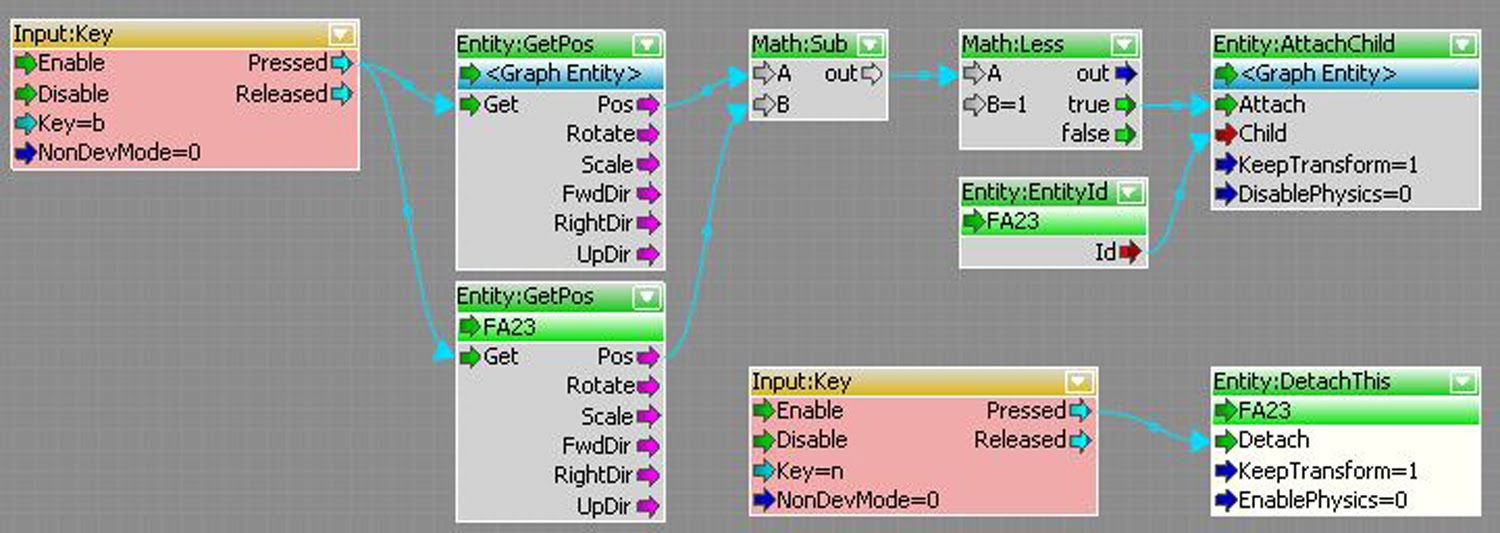
In terms of achieving my porosity lens I started to become very doubtful this week as to whether the attachment and detachment would even be possible to correctly manage due to the many attempted and failed experimentations I had carried out. However thankfully Vinh this week provided what he thought to be the solution. It was a very bold concept which we both believed would solve all problems. He proposed having an invisible skeleton with a parent centre point and then 8 children points which would move together around the faces of the cubes through a ‘mouse’ node available through the plug-in system. Further, each of the children points would test to determine whether a the skeletons child point is at the same point of the cube beneath it, if the subtraction of positions equalled zero it would attach (however through further testing by myself this equal was replaced with a less then 1). If the resultant was false it would remain detached. The conceptual sketch is included below to as how this system would work.


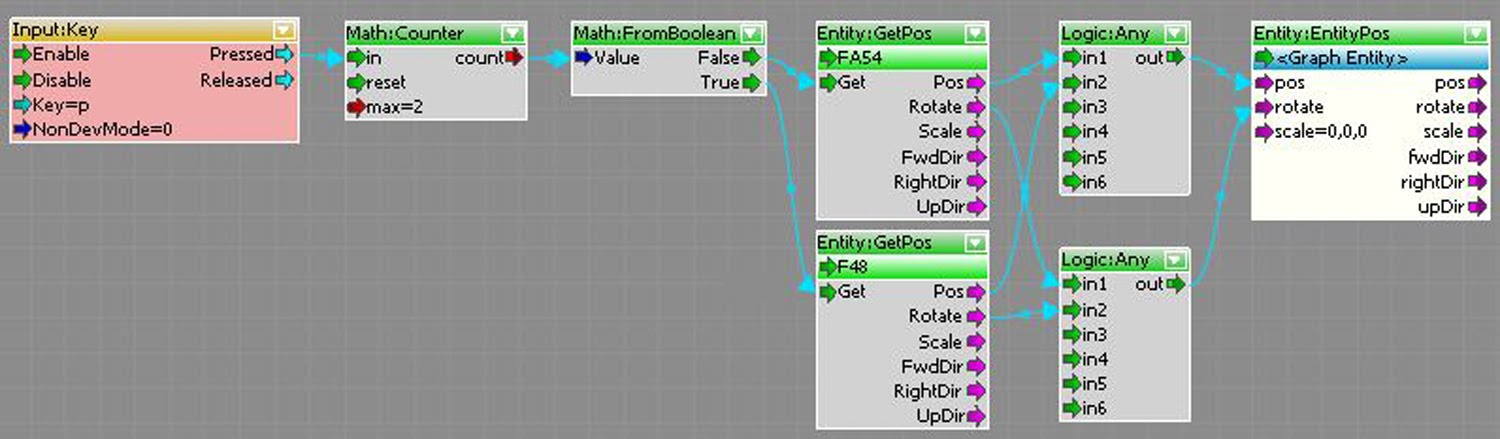
Through rigorous testing of this solution I further realised that as it was going to be impossible to have the local player walking normally vertically and upside as the faces rotate, rather the two opposite faces would rotate as a solution. However this meant the skeleton would become complex with now 17 children points. However through testing this solution it worked perfectly, in controlling the individual attachment of entities within faces. I even attempted to slightly alter the main attachment flow graph by placing a Entities: InRange node in the place of the mathematics to simplify it, however this failed so I kept with the original concept. Furthermore I was unable to get the mouse click plug-in working so I intend on researching other methods. I have included the two related flow graphs below in terms of the attachment control and the skeleton movement.


Skeleton Movement


Attachment and Detachment Management

EXP 2: Mastery Three – Entity:GetPos


Note: Recommended to view in 1080p HD.

Within the third mastery demonstration video of experiment two regarding the flow graph node “Entity: GetPos” my intent was to portray its ability regarding the calculation of numerous positions for future applications of management. This has been achieved through the attachment notion of an invisible skeleton which moves around the parameter of the main cube, comparing two values to determine whether an entity is in range and required to be attached. Such is portrayed through the first half of the video, as although the rotational attachments may appear simple, upon each new revolution the invisible skeleton is checking each of the 24 surrounding cubes to determine which entities to attach to the central rotation point cube. Furthermore to enhance this, I have included within the second half of the video, the movement of the skeleton with cubes at the end placements of the ‘children’s’ arms. This collaboration truly portrays the true mastery of this node as it is being used not only by itself but rather as a much larger and more complexly involved process of management. The manner in which such is achieved is presented beneath.


The flow graph above controls the testing and attachment of entity’s with reference to the skeleton. A key input triggers the sourcing of the cubes and relative skeletons cubes position, subtracting them before checking to see whether the resultant is less than one unit, if true it attaches, if false it doesn’t.


This flow graph controls the movement of the invisible skeleton. A key input triggers a math counter to compare the current and desired position and rotation of the parent entity of the skeleton through Entity: GetPos nodes, adjusting the current to the desired position and rotation.

Saturday, October 30, 2010

EXP 2: Mastery Two – Entity:EntityPos


Note: Recommended to view at 1080p HD.

The mastery video demonstration beneath portrays the use of the Entity:EntityPos flow graph node to calculate the local players world co-ordinates to effectively define the rotation of numerous individual entities which are attached to central point cube. Through the use of an addition control system within the flow graph one is able to control the rotational axis as which the local player’s position influences. Such enables one to accurately control the rotational angle upon a single axis rather than upon all three. Furthermore one is able define the sensitivity of the rotation in relation to the local players movement upon each individual axis separately. The manner in which this is all achieved is portrayed beneath.

The following flow graph consists of three similar components with simply different values. The local player’s position if compared to the position of the rotation point cube, before the resultant is split into individual axis, and changed, upon when it is then multiplied by a set value for each axis. The resultant is run through logic gate, to check to see whether it is too be run depending upon a key input, if so the entity’s rotational value is altered accordingly. If not, the operation is stoped.

EXP 2: Mastery One – Entity:AttachChild


Note: Recommended to view at 1080p HD.
Within the mastery video above regarding the “Entity:AttachChild” node my intention was to portray the possibilities in the attachment and detachment of numerous individual entities, conveyed through the use of rotation. In total there are 24 individual cubes which surround a centre rotational point cube upon each layer, which are completely independent of each other, thus through the use of the defined flow graph node one is able to attach them individually yet simultaneously to the rotational point. The manner in which the attachment and detachment is managed as well as the rotational mechanism is presented beneath.

The flow graph above uses a key input to trigger the attachment of the child (graph entity) to the parent (basic entity 3) when held, and upon release to detach the child (graph entity).

The following flow graph uses a key input to add a single degree to the rotation of the graph entity’s position each frame until it reaches 360.

Friday, October 29, 2010

EXP 2: Week 6: Tutorial Draft Video - Version One


The draft video tutorial above presents the general presentation mechanism I wish to use regarding the use of slides to enhance the video content. The overall video will be broken down into individual stages, and further more into individual steps which will be first outlined before then being demonstrated. Further I have decided to include all the flow graphs used within the tutorial upon slides at the beginning of the video which the responder will be able to screen shot and save for later use. Finally I have decided to create the video in HD to avoid the annoyance of watching a tutorial and not being able to identify what the person is clicking and selecting.

EXP 2: Week 6: Interconnection of Custom Textures and Forms

Through the further development of my data representation concept within experiment two I have produced three custom textures to be placed upon the custom installation. To further develop the notion of using the data in a manner that the protagonist is able to directly interact with. I have chosen to focus upon the statistics regarding the general number of men, women and youth suffering with depression in Australia. I have therefore created very simplistic textures which represents each of them, dispersing them over my custom instillations 26 individual components with reference to the statistical data. Thus the individual components of the station and installation work as a three dimension point graph perhaps of the data which the protagonist and hence responder engages with, as one moves through the environment, portrayed through the porosity lens documentary. This notion of dispersing the data is able to be presented through the diagram below.


The image below presents the three custom textures I have decided to use. Although they are very simple, outlining the first letter of each category, that are recognisable to all in terms of their purpose. Such is what I was attempting to achieve as I did not want complex textures that the responder needed to ponder in order to gain the meaning of it and its purpose within the overall project and thus the documentary. Due to the quick nature at which the scenes will transition within my documentary this was critically as the textures needed to be recognisable instantly.

EXP 2: Week 5: Tutorial – Elevating Overall Understanding through the Identified Media

With the regards to the manner in which my tutorial will elevate ones understanding my intention remains to do so through the unique application of flow graph nodes in the formation and management of independently moving entities. Through a tutorial which provides such a precise and directed application the individual will be exposed to possibilities within crysis which the typical is unfamiliar with. The combination of mixed media’s of presentation will allude to such a notion in a unique manner which provides assistance for the Crysis Sandbox at a higher level than previous and current tutorials. Through the shear conceptual and complexity of my tutorials subject will ones understanding be developed due to the manner in which the attachment and detachment mechanism exists as an invisible skeleton moving around the parameter faces of the entities collection. Although there already exist attachment and detachment tutorials they only provide information for the typical user and application, thus my tutorial will extend past both. While there are other options for achieving what I achieve within my tutorial, the process I portray does so in a manner which may not fault upon such issues as overloading a proximity or area triggers. In concluding through such a collaboration unique flow graph nodes, techniques and conceptual notions will my tutorial extend the typical users imagination and capabilities within the Crysis Sandbox 2 Editor.

EXP 2: Week 5: Porosity Documentary Draft - Version Two

The film presented beneath is version two of the draft for ones porosity documentary regarding experiment two.


Note: Recommended to view in 1080p HD Full Screen.
Within this version of my porosity documentary draft I decided to portray my concept within black and white to see if it enhances at all the overall concept behind the lens. Further more in contrast to the previous draft I ensured the film was not entirely first person. After the creation of this draft I have decided to film most of the final from an exterior camera, while remaining to have particular scenes within first person. This will allow for an overall view of the environment and conceptual aspect of the experiment. With regards to the black and white, I am yet to decide whether the final will follow using this method, I shall wait and determine that once all final filming has been carried out.

EXP 2: Week 5: Research Continued...

Time Of Day Experimentation:

Through collaborative research it has become apparent that through the Crymod website there are various time of day files which are able to be downloaded and run within any Crysis Sandbox level. I have decided to look into these to see whether there are any appropriate unique versions which would at all enhance my porosity lens documentary in terms of perhaps insinuating a strong sense of depression within the exterior environment. Through doing so I have discovered various possible options as documented below. The version in the upper left hand corner presents a true sense of loneliness through heavily scaled rain and a dense level of fog, while others present a grainy feel to the overall persona alluding conceptually to the sense of disorder. While I have also included a very realistic version which I have considered due to the extremely high quality it presents which may allow me to really define the night scenes and rain.
Entity Rotation – Local Player Tracking Version Two:

After initially discovering how I was able to control the main interactive feature of my porosity lens documentary I have been researching further into the possibilities of this notion of tracking the local players position to further refine the resultant rotations. Due to the manner in which the surfaces will rotate upon 3 axis I have been trying to identify this week whether it would be possible to lock each axis. Lucky with some assistance I have been able through the use of key inputs and logic gates. Such was achieved by breaking the previous flow graph down into the individual axis, and adding logic gates before the activation of the rotation, allowing such to be triggered by a key input. However for the final version I intend to, look at replacing these key inputs with proximity triggers which would be locate in the corners and edge pieces of the installation. I believe this would work due to the manner in which the entire cube remains rather stationary while simply the edge pieces and corners rotate. I have included the flow graph of this adjustment below.


Entity Attachment and Detachment Experimentation Four:

Following the failure of my initial attachment concept and the unreasonable option of using ray casting I have decided to look into proximity triggers. After some researching my intent was to utilise the “Inside” function of the node to simply determine whether particular cubes are within the trigger which would cover an entire face. However this proved to be much more difficult than expected due to the manner in which it is difficult gain various resultants instantly through a proximity trigger without testing each entity individually within the proximity trigger to determine whether the inside function is true or false for attachment. Even if the resultants are gained it remains difficult to assign them individual to an attachment management system which is required to check there position anyway to determine which cubes of the installation to attach in which order. I was lucky to consider this due to that it doesn’t apply to my tests within crysis as I have been using uniform cubes, thus the order is insignificant. While the station however is not uniform in its form and thus the order is critical. Such is presented below.

Entity Attachment and Detachment Experimentation Five:

Through the experimentation process of using proximity triggers to control the attachment and detachment of my installations components I was give advice to consider using rather the area trigger. I began researching this notion to discover it is basically similar to a proximity trigger. Through attempting to incorporate the actual area trigger within my experiment I discovered that this was difficult and tedious to achieve. Furthermore upon testing I remained to have the same core issues as associated in using the proximity triggers in terms of controlling various entities and their positions for attachment and detachment management. I therefore decided that this option was not viable and decided to refocus my attention somewhere else, while remaining to look into the crysis plug-in system for any other possible options.

EXP 2: Week 5: Data Representation within the Porosity Lens

Through this experiment I have discovered that data representation is simply not statistics or graphs etc, it is rather an art form of representation. Thus in considering the manner in which I am going to represent data within experiment two I decided to first research some data regarding the core elements of my porosity lens. Outlined below are the key points I have gathered from the research regarding depression which I undertook for further consideration in terms of representation.

- Depression appears within our lifestyles at different stages, whether it is in the teenage years of our youth, throughout our adulthood or in our later life due to other physically conditions.
- At any one given time within Australia, one in six men will experience depression while at the same time one in three women will, twice that of men.
- In terms of Australian youth it is believed one in twenty adolescents will experience depression, with the potential for such to develop further into their adult life.
- Focusing upon women, depression appears more commonly within younger women within the age bracket of roughly 15 to 45.
- Four times the number of young men commit suicide to that of young women according to the Australian Bureau of statistics, tripling within in the last 30 years.

Through the information discovered above I have deepened my personal knowledge of depression, which will now allow me to identify the most appropriate manner of representation within the experiment. After consideration I have decided to use my porosity lens as a means of if you will public awareness regarding depression as through the incorporation of such information will I allude to the manner in which depression exists within society. Thus interconnecting with my porosity lens in portraying the manner in which those who suffer interact within their environment.

Therefore I have decided to create custom textures that represent particular statistics above, applying them to my custom installation. Through doing so I will be able to allude within my documentary the manner in which depression surrounds everyday society, as the protagonist will directly interact with the representations as he moves throughout the environment. This will be enhanced through a juxtaposition of general tones within the environment as the light tone of the station and the installation work in contrast to the overall dark environment alluding to the presence of depression within our every day environments further.

EXP 2: Week 4: Porosity Documentary Draft - Version One

The film below presents the first draft version of my porosity documentary regarding experiment two.


Note: Recommended to view at 1080p HD.
Within the first draft version my final film my intent was to explore the nature of filming from first person rather than an exterior point to directly connect the responder to the protagonist’s point of view. However upon completing this draft I am not sure this is the most effective way in the portray of the rotating components, thus the interactive sections. Although it remains to present this in a rather nice and interesting perspective I think I need to explore additional manners of perception within the following drafts before presenting the final version.

EXP 2: Week 4: Brief Tutorial Subject Outline

With regards to the creation of a tutorial which interconnects the work of both experiments within the BENV2423 course my intention is to present a tutorial on the subject of the “Attachment and Detachment of Various Independently Uniformly Moving Entities” within Crysis. I have decided upon this subject for a tutorial due to lack of precise tutorials regarding the complex attachment and detachment of moving entities, as at the moment tutorials only particularly cover general simplistic attachment and detachment. Thus by providing a more detailed method in controlling numerous uniformly independently moving entities I will be able to open up the possibilities within this field for others. I have discovered and become quite familiar within this field through the research covered within experiment two. In concluding through this tutorial I wish to in general provide a manner in which one would be able to control various moving entities in terms of attachment and detachment within uniform fields.

Thursday, October 28, 2010

EXP 2: Week 4: Lecture Flow Graphs – Attach and Opacity

- Opacity Section -
In terms of the experimentation of opacity within experiment 2 I decided to perform such upon my sketch installation in the form of doors. Through placing various simple block doors in the transitions between the various planes of the installation I wished to identify the frequency at which the individual moves between these spaces, simply identified through the darkness of the doors at the end. The purpose of such experimentation with regards to my porosity lens exists in the field of identifying whether those with depression in fact through their systematic approach to everyday tasks subconsciously follow specific paths. Hence do they define their movement on the possible paths or the reason behind their moments, thus the task to be completed? However due to complex nature of this I have been unable to fully portray this in the limited video below; rather I have simply presented the general concept to perhaps allude to this notion within the final documentary through the rotations rather than opacity blocks.


Note: Recommended to watch in 1080p HD.
- Attachment Section -


Note: Recommended to watch in 1080p HD.
To experiment with the attachment of entities to the local player within crysis, I decided to consider the manner in which our motion changes as more objects become attached. Thus I placed numerous custom white spheres created in Sketch Up all over the ground applying a flow graph and proximity trigger to ensure as the local player moves close they attach to him. Through such I discovered that initially the player moves at a normal velocity, however as the entities attach his movement is slowly restricted, interconnecting with porosity lens brief in terms of that as we move through life problems attach themselves to us, however it those without depression who simply let them go. While those suffering from depression remain attached, in sense forming a path through life as seen in the demonstration video above.